Computer Applications
Answer
We follow the given steps to print a complete workbook:
Step 1 — Click the File tab and select Print to access the Print pane.
Step 2 — Select the option Print Entire Workbook from the print range drop-down menu in the Settings section.
Step 3 — Change the page orientation either Portrait or Landscape from the Orientation drop-down list.
Step 4 — Choose the printer from the Printer drop-down list.
Step 5 — Enter the number of copies in the Copies spin box.
Step 6 — After selecting all the required options, click on the Print button.
The entire workbook will be printed.
Related Questions
Explain the different components of a chart.
What is Pie chart? Describe its features.
Describe the text formatting features of MS Excel and how are these useful.
A chart displaying the subject wise attendance of four students and its source data have been given to you. Answer the following questions based on them:
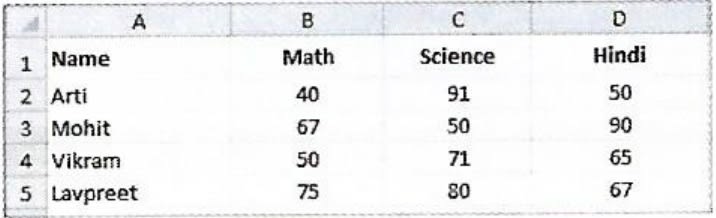

(i) Identify the Type of chart.
(ii) What is the title of the chart?
(iii) List the cell references of the three cell ranges used to produce this chart.
(iv) Suggest a suitable label for both category axis and value axis.