
Computer Applications
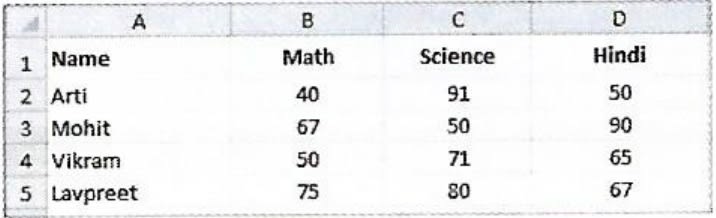
A chart displaying the subject wise attendance of four students and its source data have been given to you. Answer the following questions based on them:
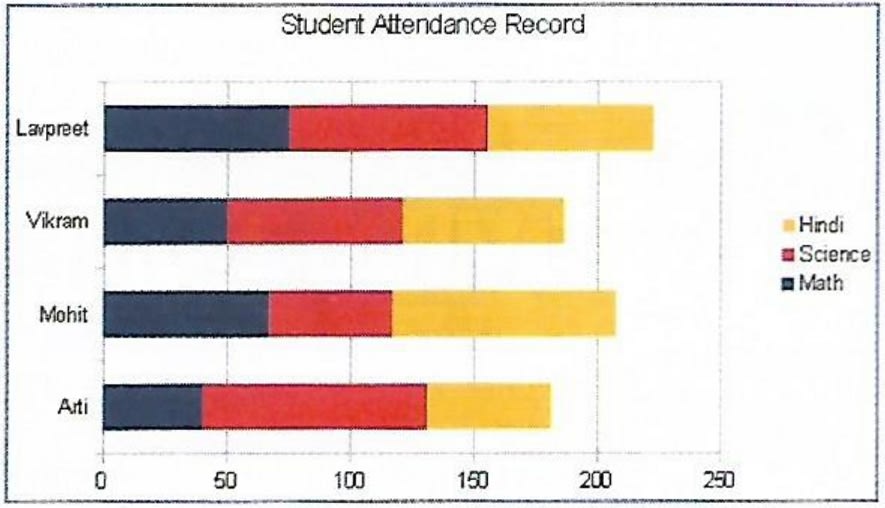
(i) Identify the Type of chart.
(ii) What is the title of the chart?
(iii) List the cell references of the three cell ranges used to produce this chart.
(iv) Suggest a suitable label for both category axis and value axis.
MS Excel
14 Likes
Answer
(i) The given chart is a type of stacked bar chart.
(ii) The title of the chart is 'Student Attendance Record'.
(iii) The cell references of the three cell ranges used to produce this chart are:
- B2 : B5
- C2 : C5
- D2 : D5
(iv) A suitable label for Category Axis can be 'Student Name'.
A suitable label for Value Axis can be 'Number of Days'.
Answered By
11 Likes
Related Questions
Explain the process of printing a complete workbook.
Describe the text formatting features of MS Excel and how are these useful.
A table containing descriptions of different types of charts is given below. Names of some charts are given below within the bracket. Fill them in front of their respective descriptions and complete the assignment.
[Stock, Area, Bar, Pie, Line, and Radar]
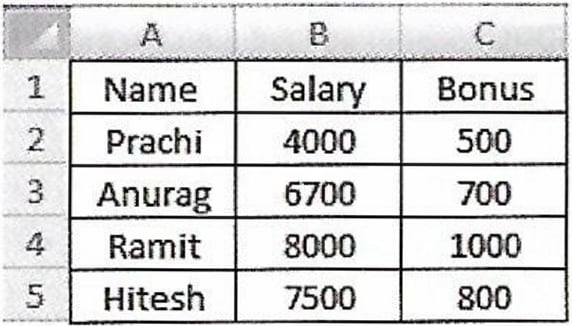
Name Description It displays data in the form of long rectangular rods also called bars. This chart displays data in the form of a circle. It emphasizes the magnitude i.e., the volume of change over time. It is designed specifically for plotting data values related to stocks and shares. It is in the form of lines and is used to illustrate trends in data at equal intervals. It is a type of chart that resembles a spider net. A 3D line chart on Employee Payroll System is given below. Apply the following formatting effects to the chart:
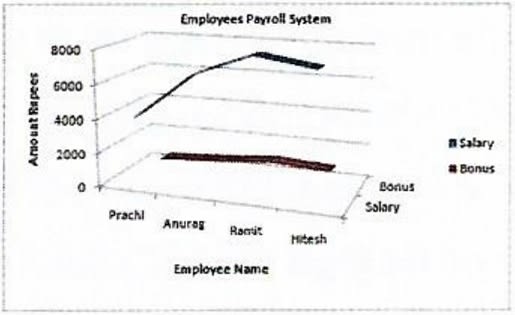
(i) Change the Chart Title to 'Employee Salary and Bonus'.
(ii) Change the title of X axis to 'Names' and Y axis to 'Amount'.
(iii) Change the Font of Chart Title to 'Tahoma', Font size as 16, Font style as Bold and Font color as blue.
(iv) Change the scale for Y axis and display the values between 100 to 8500.