Computer Applications
From the above created worksheet find out the average marks for the entire class using appropriate formulas.
Answer
The average marks for the entire class is 75.2.

Explanation
We follow the following steps to find the average marks for the entire class:
Step 1 — Find the total marks for each student.
Select F2 and write the formula =SUM(C2 : E2). This formula will calculate the total marks of a student.
With F2 selected, dragging the cell handle from F3 to F6 will copy the formula to the cell range [F3 : F6].
Step 2 — Find the average marks for each student.
Select G2 and write the formula =AVERAGE(C2 : E2). This formula will calculate the average marks of a student.
With G2 selected, dragging the cell handle from G3 to G6 will copy the formula to the cell range [G3 : G6].
Step 3 — Find the average marks for the entire class.
Select cell G8 and write the formula =AVERAGE(G2 : G6).
Related Questions
Clear the copied data range (do not touch the 23. original data range).
Create the following worksheet in Ooo Calc :
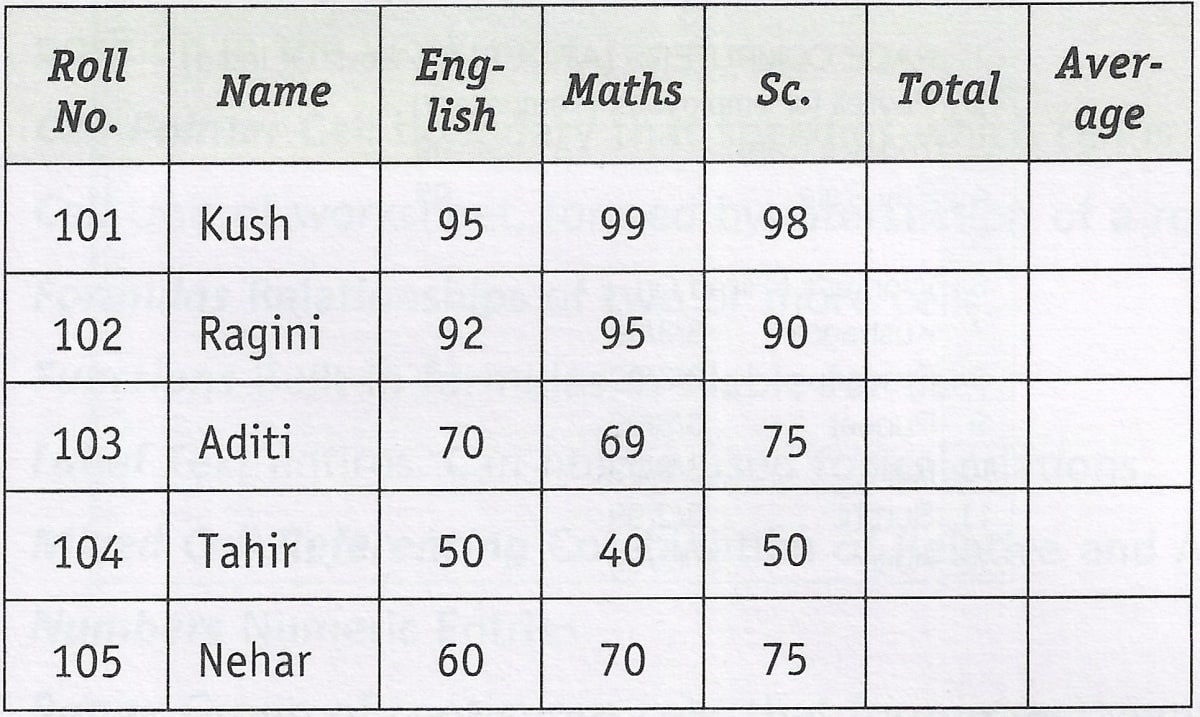
Now copy the range consisting of the mentioned entire data (including total, average & class average) to a new location. Find out whether the cell references in formulas change or not.
Now move the original data range (including total, average and class average) to a new location. Find out whether the cell references in formulas change or not.