
Computer Applications
From the above created worksheet find out the average marks for the entire class using appropriate formulas.
OOo Calc
9 Likes
Answer
The average marks for the entire class is 75.2.

Explanation
We follow the following steps to find the average marks for the entire class:
Step 1 — Find the total marks for each student.
Select F2 and write the formula =SUM(C2 : E2). This formula will calculate the total marks of a student.
With F2 selected, dragging the cell handle from F3 to F6 will copy the formula to the cell range [F3 : F6].
Step 2 — Find the average marks for each student.
Select G2 and write the formula =AVERAGE(C2 : E2). This formula will calculate the average marks of a student.
With G2 selected, dragging the cell handle from G3 to G6 will copy the formula to the cell range [G3 : G6].
Step 3 — Find the average marks for the entire class.
Select cell G8 and write the formula =AVERAGE(G2 : G6).
Answered By
4 Likes
Related Questions
Clear the copied data range (do not touch the 23. original data range).
Create the following worksheet in Ooo Calc :
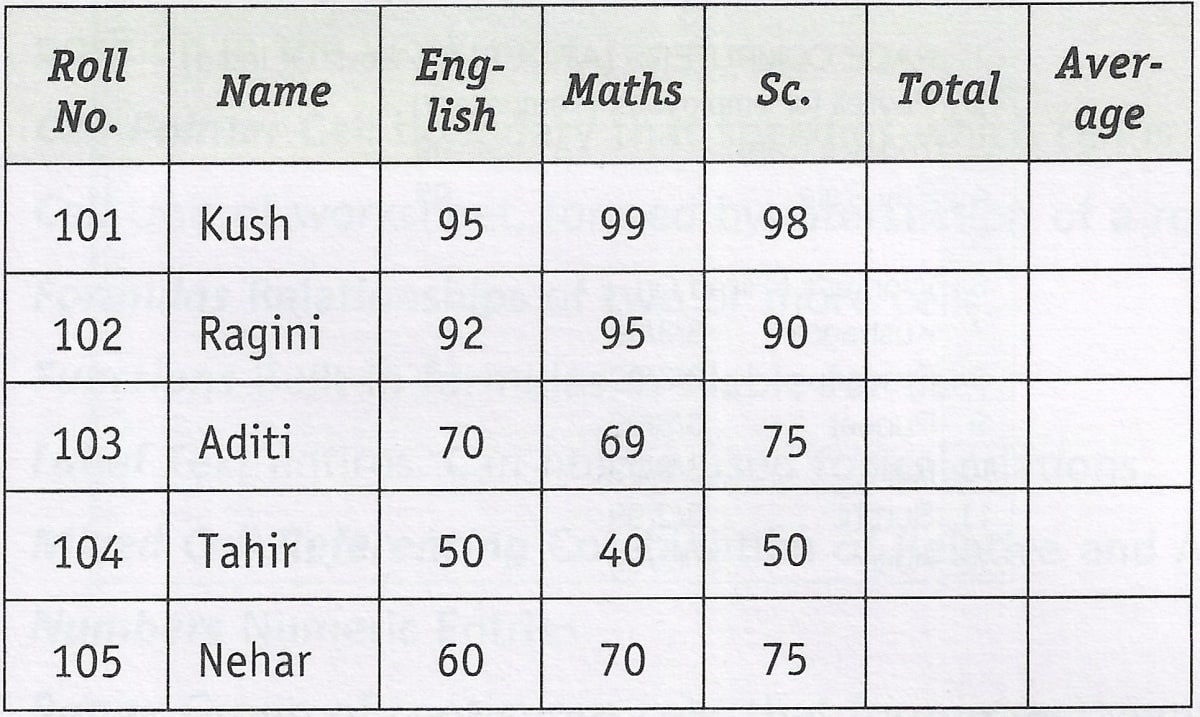
Now copy the range consisting of the mentioned entire data (including total, average & class average) to a new location. Find out whether the cell references in formulas change or not.
Now move the original data range (including total, average and class average) to a new location. Find out whether the cell references in formulas change or not.