
Write any two methods that you/your parents are using to protect your digital hardware.
Answer
Two methods that I / my parents are using to protect our digital hardware are:
- We always keep our hardware assets in a safe place.
- We have set up an authentication mechanism (such as a password) on our devices to protect them.
With the help of your teacher, identify three emails that can be considered spam or seem that they have been sent for phishing purposes.
Answer
Three emails that can be considered spam or sent for phishing purposes are:
- An email that appears to be from a bank official asking the user to click on a link for online document verification and enter personal details.
- An email or message that looks like it is sent from a well-known organisation, containing a suspicious link that redirects to a fake website.
- An email requesting personal or financial information such as account number, password, or credit card details through links or attachments.
Write down any two safety measures that you or your parents are following to protect your computer from being hacked.
Answer
Any two safety measures that I / my parents are following to protect our computer from being hacked are:
- We use strong passwords and update them frequently.
- We are cautious while opening emails or messages and do not click on suspicious links or attachments.
Write down any two observations that you have noticed in the degradation in a computer that has become 7 to 10 years old.
Answer
Any two observations noticed in the degradation of a computer that has become 7 to 10 years old are:
- The booting time of the computer increases and it takes longer to start.
- The overall performance becomes slow, which may be due to hardware degradation, memory occupancy, or malware attacks.
Unauthorised access of computer hardware may result in data theft.
Answer
True
Reason — Unauthorised access to computer hardware may result in data theft, as an unauthorised person can access personal information such as contacts, data, and history stored on the device.
A user connects a USB drive to a work computer that they do not own is an example of unauthorised access.
Answer
True
Reason — When a user connects a USB drive to a work computer that they do not own, it means the computer hardware is being used without permission, which is considered unauthorised access to hardware.
Data privacy is not an important concern in unauthorised access of hardware.
Answer
False
Reason — Privacy is an important concern in unauthorised access of hardware because an unauthorised person can access personal information like contacts, data, and the history of a person.
Malware are developed to harm computer software.
Answer
True
Reason — Malware is a software developed to harm a computer system. These software can be installed on the computer unknowingly and can be used to steal personal information, by getting a backdoor entry into the computer.
Virus does not affect computer functioning.
Answer
False
Reason — A virus is a harmful program that can harm or steal data from a computer system and can affect the functioning of the computer.
Making false commitment regarding a product’s feature is normal.
Answer
False
Reason — Making false commitments regarding a product’s features is an ethical issue and can mislead customers, leading to financial loss and loss of trust.
Using someone's open email account to send an email without their permission is an ethical practice.
Answer
False
Reason — Using someone else’s email account without their permission is an example of unauthorised use, which is not an ethical practice.
We should always use a strong password to protect our digital assets.
Answer
True
Reason — Using strong passwords helps protect digital assets by preventing unauthorised access to computers and networks.
Which of the following is not an example of unauthorised access to hardware?
- Using friend’s computer without his permission
- Using your own computer
- Using computer of an organisation without access permission
- None of these
Answer
Using your own computer
Reason — Unauthorised access means using computer hardware without permission. Using our own computer does not involve accessing someone else’s hardware, so it is not an example of unauthorised access.
What could be the consequences of unauthorised access to hardware?
- Data theft
- Information sharing
- Damage to hardware
- All of these
Answer
All of these
Reason — Unauthorised access to hardware can lead to data theft, information sharing, and may also cause damage to hardware, resulting in serious security and privacy issues.
What is the meaning of software theft?
- To use trial versions of software
- Borrowing software
- Using pirated software
- None of these
Answer
Using pirated software
Reason — Software theft means the unauthorised use of software, whether by copying or modifying it. Pirated software is a form of software theft and means the illegal download or copying of software from the internet.
Why software theft is an important concern for software developers and companies?
- Helps in increasing sale
- Helps in promotion
- Results in financial losses
- Encourages competition
Answer
Results in financial losses
Reason — Software theft causes financial losses to software developers and companies because their software is used or distributed without authorisation or payment.
Which of the following is the right way to get a software?
- Use licence cracker and take pirated copy
- Purchase software from authorised vendor
- Take licence key from friend
- Copy software from friend’s computer
Answer
Purchase software from authorised vendor
Reason — Software should always be purchased from authorised vendors or official websites to avoid software theft and illegal use of software.
Which of the following means the illegal download or copying of software from the internet?
- Contractual disputes
- Malware
- Digital piracy
- Phishing
Answer
Digital piracy
Reason — Digital piracy means the illegal download or copying of software from the internet.
Disputed rights to products occur with ............... .
- Intellectual property infringement
- Contractual disputes
- Property disputes
- All of these
Answer
All of these
Reason — Disputed rights to products occur due to intellectual property infringement, contractual disputes, and property disputes between different parties.
Which of the following can harm a computer?
- Operating system
- Device driver
- Malware
- None of these
Answer
Malware
Reason — Malware is a software developed to harm a computer system.
Fill in the blanks:
- Patent is an example of .................
- ................ means to crack software protection key.
- Infected pen drive could be a medium to transfer ................ .
- Using someone else’s computer with ................ will be an authorised access.
- Disputed rights for products mean ................ between different parties.
Answer
- Patent is an example of Intellectual property right.
- Warez cracking means to crack software protection key.
- Infected pen drive could be a medium to transfer viruses.
- Using someone else’s computer with permission will be an authorised access.
- Disputed rights for products mean disagreement between different parties.
Give an example of unauthorised access.
Answer
An example of unauthorised access is using someone else’s computer hardware without their permission.
What do you mean by hacking? Explain with the help of an example.
Answer
Using someone else’s computer, software, or network in an unauthorised manner is called hacking. The purpose of the hackers behind this is to steal data, modify the software, install malware, or observe every activity of the software.
Example: A hacker may install malware in an organisation’s website’s database to collect the visitor’s information.
What are the various safety measures to avoid hacking?
Answer
The various safety measures to avoid hacking are:
- Organisations must take precautions to protect themselves against hacking and data theft.
- Strong security measures should be put in place, such as employing strong passwords, encrypting data, and using firewalls.
- Employees should be trained to recognise and report suspicious behaviour.
- Organisations should be informed of the most recent hacking and data theft strategies and threats.
What do you mean by virus? Explain with the help of an example.
Answer
A virus is a harmful program that can harm or steal data from a computer system. Viruses can be transmitted by email attachments, malicious websites, or infected USB sticks.
Example: The Stuxnet virus was a malware designed to attack Iran’s nuclear programme. It infiltrated computers in nuclear plants and caused considerable damage to the systems.
What are the various ways to avoid or reduce the degradation of systems?
Answer
The various ways to avoid or reduce the degradation of systems are:
- Keep the software updated.
- Use trusted antivirus and antimalware programs.
- Purchase hardware from a well-known company by analysing its history and current scenario.
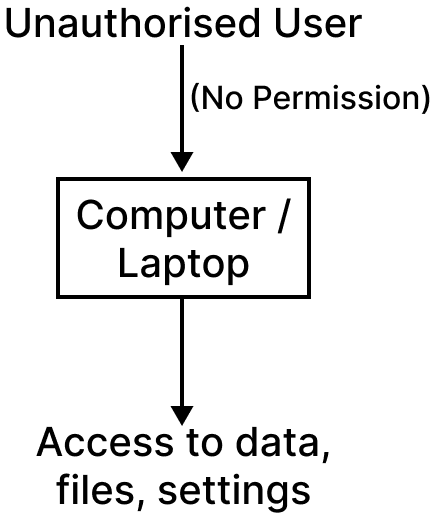
Draw a labelled diagram that illustrates the unauthorised use of hardware.
Answer
Labelled diagram illustrating unauthorised use of hardware:
What are the ways to resolve disputed rights to products?
Answer
The dispute may be resolved using the following methods:
- Parties may negotiate on some common points and resolve the issue.
- A mediator or third party can help in resolving the conflicts.
- In arbitration, a neutral third party renders a legally binding ruling once the parties have mutually agreed to submit their dispute to it.
- The parties can go through the more formal and time and money consuming process of litigation and file a lawsuit in court.
What could be the safety measures to avoid software theft?
Answer
The various safety measures to avoid software theft are:
- Be aware of the consequences of using pirated software.
- Keep all your software at a safe place.
- Always purchase software from authorised vendors or official websites.
- To discourage such practices, take action against dealers or distributors of pirated software.
Explain computer fraud with the help of an example.
Answer
Computer fraud is the use of computers to perpetrate fraud, which is any deception or misrepresentation designed to result in financial or personal advantage.
Example: A person receives an email that appears to be from a bank official with instructions for online document verification. A link is provided in the email. When the person clicks on the link, it opens a fake website of that bank. The person enters all the details on that website, and all the information is stolen by the fraudster.
What could be the various safety measures to avoid computer fraud?
Answer
The various safety measures to avoid computer fraud are:
- Be cautious about the information you share online and do not provide personal details unless you are confident the website is genuine.
- Keep your software up to date, as updates include security fixes that help protect against viruses.
- Be wary of emails or SMS messages requesting personal information and do not click on suspicious links or attachments.
- Use secure passwords and update them frequently.
Explain the risks and implications of unauthorised access with an illustrative example.
Answer
Unauthorised access means using computer hardware without permission. This access can be used to manipulate system settings and data, and the implications of this act could be very harmful for an individual or an organisation.
Risks and implications of unauthorised access:
Privacy: It may be an attack on the privacy of a user or organisation. An unauthorised person can access personal information like contacts, data, and the history of a person.
Security: The unauthorised access to hardware may result in security issues. The websites or networks used by that unauthorised access may be susceptible to different security concerns, like hackers attacking your hardware through those sites.
Example: If a person uses someone else’s computer in a public place without permission and accesses files or browses websites, it is an example of unauthorised access. This may expose the system to malicious websites or allow the person to misuse personal data stored on the computer.
What are the preventive measures that can be taken by organisations and individuals to prevent unauthorised use of hardware and its associated risks?
Answer
The preventive measures that can be taken by organisations and individuals to prevent unauthorised use of hardware and its associated risks are:
- Always keep hardware assets in a safe place.
- Set up an authentication mechanism on devices to protect them.
- Take permission from the owner before using their computer or any digital device.
- Always log out of all accounts, especially when working on a public computer.