
The task of a mechanical block is to provide the body to a robot.
Answer
True
Reason — The mechanical block of a robot creates its physical structure and provides the outer body of the robot, which helps robots work in a real-world scenario and interact with their environment.
The controller controls the functioning of a robot.
Answer
False
Reason — The mechanical block of a robot is controlled by a controller. The task of the controller is to accept input from the sensor and send signals to other components and blocks of the robot.
Joints and links are the mechanical parts of the body of a robot.
Answer
True
Reason — Joints help robots to move, and joints and links together create the structure of a robot, forming the mechanical parts of the body.
Prismatic joint represents the motion on multiple axis.
Answer
False
Reason — Prismatic joints are also known as linear joints. These joints allow the links to move in a straight line along an axis.
Tinkercad allows the 3D designing of the mechanical parts of the body of a robot.
Answer
True
Reason — Tinkercad provides 3D design of different components, which helps in better visualisation of the mechanical parts of the body of a robot.
Tinkercad is developed by Amazon.
Answer
False
Reason — Tinkercad is a freely available online software program developed by Autodesk and is used to visualise, design, and create components.
Tinkercad can be used as a desktop application.
Answer
False
Reason — Tinkercad is a freely available online software program, not a desktop application.
The RR mechanism consists of one revolute and one prismatic joint.
Answer
False
Reason — The RR (Revolute-Revolute) mechanism means the use of two revolute joints in series, commonly used in a robotic arm.
Arduino Uno is an example of ............... .
- Sensor
- Actuator
- Controller
- Motor
Answer
Controller
Reason — Arduino Uno is a microcontroller, and it is used as a controller for designing robots.
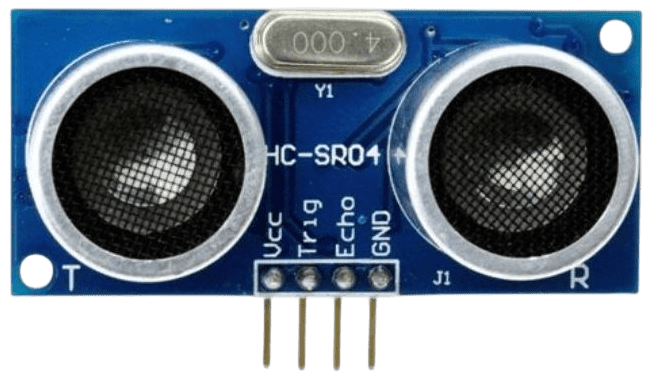
Below image is representing ............... .
- IR sensor
- Ultrasonic sensor
- Solar sensor
- Temperature sensor
Answer
Ultrasonic sensor
Reason — The image represents an Ultrasonic Distance sensor.
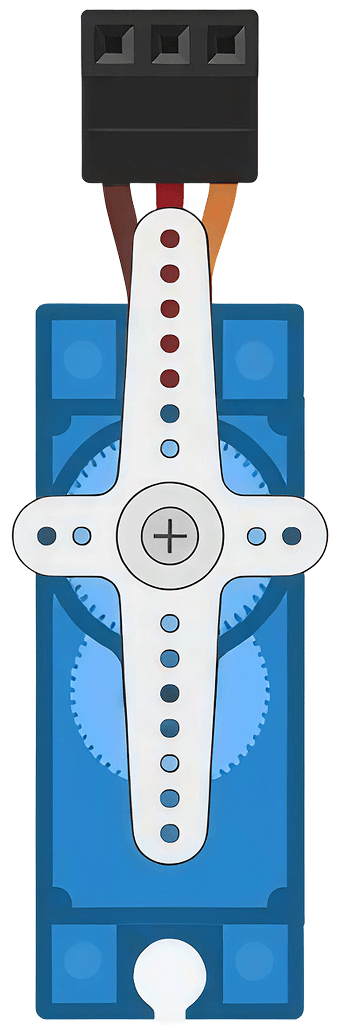
Below image is representing ............... .
- Micro servo
- Hydraulic motor
- Water motor
- None of these
Answer
Micro servo
Reason — The image shows a Micro Servo, which is listed under motors available in Tinkercad for robotic design.
Tinkercad allows ............... .
- Only 2D designs
- Only architectural designs
- 3D designs and simulations
- Only text-based designs
Answer
3D designs and simulations
Reason — Tinkercad provides 3D design of different components, which helps in better visualisation and understanding, and it also provides support for basic robotic design.
Which of the following is an important advantage of Tinkercad?
- It requires advanced programming skills
- A user-friendly platform
- Very complex simulation features
- None of these
Answer
A user-friendly platform
Reason — Tinkercad is a freely available online software program that is used to visualise, design, and create components, which makes it easy to use and understand.
Which of the following is responsible for the mechanical part of a robot?
- Giving shape to the robot
- Allowing interaction with outer environment
- Protecting robot's electronic part
- All of the above
Answer
All of the above
Reason — The mechanical block of a robot provides its outer body and helps in interacting with its outer environment. It also creates the physical framework of a robot, allowing integration of different components and supporting them, thereby protecting the electronic parts.
Revolute joint shows rotation along ............... .
- Single axis
- Multiple axis
- Either a or b
- None of these
Answer
Single axis
Reason — Revolute joints, also known as rotary joints, allow the links to rotate around an axis.
Below image is representing a ............... .

- Humidity sensor
- Temperature sensor
- Transistor
- None of these
Answer
Temperature sensor
Reason — The given image represents a Temperature Sensor, which is shown as one of the sensors available in Tinkercad when searching for sensors.
Fill in the blanks:
- The ................ are the tools used to interact with the outer environment.
- ................ is very important in medical robots.
- The end effector for a painter robot would be a ................ .
- Tinkercad can be used for 3D designing and ................ .
Answer
- The End effectors are the tools used to interact with the outer environment.
- Precision is very important in medical robots.
- The end effector for a painter robot would be a Paint brush.
- Tinkercad can be used for 3D designing and Simulation.
What is Tinkercad?
Answer
Tinkercad is a freely available online software program developed by Autodesk. It is used to visualise, design, and create circuits. It provides 3D design of different components, which helps in better visualisation and understanding, and also supports basic robotic design.
Write the names of the sensors available in Tinkercad.
Answer
The sensors available in Tinkercad are:
- Photoresistor (Light Sensor)
- Soil Moisture Sensor
- Ultrasonic Distance Sensor
- PIR Sensor
- Temperature Sensor
Write the names of the batteries available in Tinkercad.
Answer
The batteries available in Tinkercad are:
- 9V Battery
- Coin Cell 3V battery
- 1.5V Battery