Which of the following String methods results into boolean data type?
- trim()
- equals()
- replace()
- concat()
Answer
equals()
Reason — In Java, the equals() method compares the contents of two strings and returns a boolean value (true or false), whereas trim(), replace(), and concat() return new strings, not boolean values.
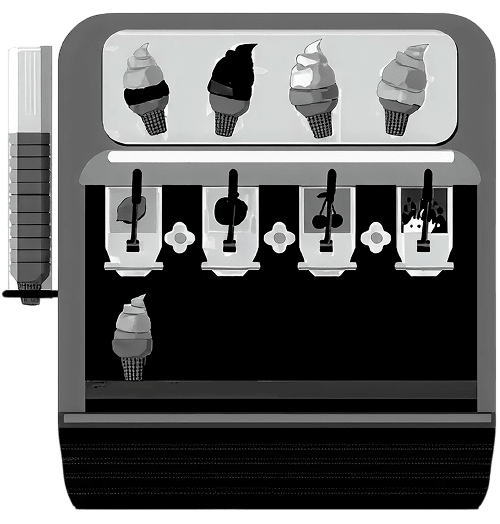
Which construct can be used to get only one of the required ice creams?
- switch construct
- while construct
- do.. while construct
- for construct
Answer
switch construct
Reason — The switch construct can be used to select and execute only the case that matches the required ice cream choice, skipping all other cases, which makes it suitable when only one specific ice cream needs to be selected from several options.
Which statement is correct for the method prototype given below:
int check(char ch, String s)
- check() does not return any value
- check() has return type int
- check method has two actual parameters
- check() is a constructor
Answer
check() has return type int
Reason — In the method prototype int check(char ch, String s), the keyword int before the method name specifies that the method returns an integer value. The parameters char ch and String s are formal parameters, and the method is not a constructor as it has a return type.
The Math method which returns int value is:
- round()
- cbrt()
- ceil()
- random()
Answer
round()
Reason — The round() method returns an int. Other methods like cbrt() and ceil() return double, while random() returns a double value between 0.0 and 1.0.
What is the output of the following statement:
“MONOPOLY”.lastIndexOf(‘O’);
- 1
- 3
- 2
- 5
Answer
5
Reason — In the string "MONOPOLY", the character 'O' occurs at indexes 1, 3, and 5 (indexing starts from 0). The lastIndexOf('O') method returns the last occurrence of 'O', which is at index 5.
Typecasting is often necessary when dealing with financial data. Identify the correct syntax to typecast a double to an int using the variables:
int amount; double valueINR
- int amount = valueINR;
- int amount = Integer.parseInt (valueINR);
- int amount = (int) valueINR;
- int amount = int (valueINR);
Answer
int amount = (int) valueINR;
Reason — The correct syntax to typecast a double to an int in Java is by placing (int) before the double variable, which converts it to an integer by removing its decimal part.
What is the output of the code snippet given below?
int lives = 5;
System.out.print(lives--);
System.out.print(lives);- 4 3
- 5 4
- 5 3
- 4 4
Answer
5 4
Reason — In System.out.print(lives--), the post-decrement operator (lives--) prints the current value of lives (which is 5) first, then decreases it to 4. The next System.out.print(lives) prints the updated value 4.
What will be the output of the following statement?
String s = "JavaProgramming";
System.out.println(s.substring(4, 11).toUpperCase());- Programm
- PROGRAMM
- PROGRAM
- program
Answer
PROGRAM
Reason — In the string "JavaProgramming", indexing starts at 0. substring(4, 11) extracts characters from index 4 to 10, which is "Program". Calling .toUpperCase() converts it to "PROGRAM".
Which of the following access specifiers will make a member accessible only within its own class?
- public
- private
- protected
- default
Answer
private
Reason — In Java, the private access specifier restricts a member’s visibility so it can be accessed only within the same class where it is declared.
What will be the output of the following Java method?
Character.isLetterOrDigit('\n')- 1
- 0
- true
- false
Answer
false
Reason — The method Character.isLetterOrDigit('\n') checks whether the given character is a letter or a digit. The character '\n' represents a newline, which is neither a letter nor a digit, so the method returns false.
Which of the following is not a type of token in Java?
| 1. Method | 3. Literal |
| 2. Identifier | 4. Keyword |
- only 1
- 1 and 3
- only 2
- only 4
Answer
only 1
Reason — In Java, the main types of tokens are keywords, identifiers, literals, operators, and separators. A method is not considered a token; it is a block of code that performs a task.
The statement given below is termed as:
public void Accept(int a)
- Method signature
- Method block
- Method prototype
- Constructor
Answer
Method prototype
Reason — In Java, a method prototype specifies the method’s access specifier, return type, name, and parameter list without including its body. The statement public void Accept(int a) shows these elements but does not contain a method body, so it is a method prototype.
What is the output of the following Java code?
boolean flag = false;
if (flag) {
System.out.println("True");
} else {
System.out.println("False");
}- True
- False
- No output
- Compilation error
Answer
False
Reason — The code declares a boolean variable flag with the value false, checks it in the if condition, and since it evaluates to false, the if block is skipped and the else block executes, printing False to the output.
Identify the static method from the list given below:
- length()
- nextLine()
- substring(int)
- isLetter(char)
Answer
isLetter(char)
Reason — The method isLetter(char) belongs to the Character class and is a static method, meaning it can be called using the class name without creating an object. The other methods (length(), nextLine(), substring(int)) are instance methods that require an object to be invoked.
Which one of the following will be the output of the below statements?
String a[]={"Rohini", "Rajarshi", "Rajeev", "Rehan", "Rebecca"};
System.out.println(a[2].substring(2));- jeev
- Ra
- Raj
- je
Answer
jeev
Reason — In the array, the element at position 2 is "Rajeev". In Java, string indexing starts from 0, so index 0 = R, index 1 = a, and index 2 = j. Using substring(2) means we take all characters from index 2 to the end, giving "jeev".
System.out.println(Math.round(Math.ceil(-8.8))); will result in:
- 8.0
- -8.0
- -9
- -8
Answer
-8
Reason — First, Math.ceil(-8.8) returns -8.0 because ceil() rounds a number up to the nearest integer (for negative numbers, “up” means closer to zero). Then, Math.round(-8.0) returns the integer -8, as round() converts a floating-point number to the nearest whole number.
Which one of the following Java statements assign 100 to the last element of a 3 × 3 array?
- x[2][2]=100;
- x[3][3]=100;
- x[2][3]=100;
- x[3][2]=100;
Answer
x[2][2]=100;
Reason — In Java, array indexing starts from 0, so a 3 × 3 array has valid row and column indices 0, 1, and 2. The last element is at row index 2 and column index 2, so x[2][2] = 100; correctly assigns the value 100 to that element.
Consider the Two dimensional array S[2][3], of storage devices given below, state the index of the Hard disk.
![Consider the Two dimensional array S[2][3], of storage devices given below, state the index of the Hard disk? ICSE 2025 Computer Applications Solved Question Paper.](https://cdn1.knowledgeboat.com/img/abp10/1/q1-18-icse-computer-board-2025-improvement-1133x731.png)
- S[1][0]
- S[0][1]
- S[1][2]
- S[0][0]
Answer
S[1][0]
Reason — In a two-dimensional array S[2][3], the first index represents the row and the second index represents the column, both starting from 0. Based on the given arrangement of storage devices, the element "Hard disk" is located in the second row (index 1) and first column (index 0), so its index is S[1][0].
How many times the for statement given below is executed?
for(k = 10; k >= 0; k--)
- 10
- 11
- 12
- 0
Answer
11
Reason — The loop starts with k = 10 and runs while k >= 0. This includes both k = 10 and k = 0, so the values of k will be: 10, 9, 8, ..., 1, 0 — a total of 11 iterations.
Consider the following program segment in which the statements are jumbled. Choose the correct order of the statements to return the sum of first 10 natural numbers.
for(i=1; i<=10; i++)  → 1
return sum;           → 2
int sum = 0, i;       → 3
sum+=i; → 4- 1 2 3 4
- 3 4 1 2
- 1 4 2 3
- 3 1 4 2
Answer
3 1 4 2
Reason — To return the sum of first 10 natural numbers, we must follow the proper sequence of statements:
int sum = 0, i;– Declare the variablessumandi, and initializesumto 0.for(i=1; i<=10; i++)– Start the loop to go through numbers 1 to 10.sum+=i;– Add the current numberitosumduring each loop iteration.return sum;– After the loop completes, return the total sum.
Write Java expression for the following:
Answer
Math.pow(x, 10) + Math.pow(y, 10)
Evaluate the given expression when x = 4.
x *= --x + x-- + x;
Answer
x *= --x + x-- + x
x = x * (--x + x-- + x)
x = 4 * (--x + x-- + x)
x = 4 * (3 + x-- + x)
x = 4 * (3 + 3 + x)
x = 4 * (3 + 3 + 2)
x = 4 * 8
x = 32
Convert the following switch case into if else if:
switch(x)
{
case 'T' :
case  't'  : System.out.print("Teacher");  break;
default  :  System.out.print("Student");
}
Answer
if (x == 'T' || x == 't') {
    System.out.print("Teacher");
} else {
    System.out.print("Student");
}Write the output of the following program segment:
for(int a = 1; a <= 10; a++)
{
if(a % 2 == 0)
continue;
System.out.print(a + "  ");
}
Answer
1 3 5 7 9
- The loop control variable
ais initialized to 1 and is incremented by 1 after each iteration until it attains the value 10. - The condition
if (a % 2 == 0)tests whetherais an even number. If the condition is true, thecontinuestatement transfers control to the next iteration of the loop, thereby skipping the print statement. - Consequently, only the odd values 1, 3, 5, 7, and 9 are displayed by the statement
System.out.print(a + " ");.
In the example given below of class Cat, identify the variable and the methods:
| Cat |
| Name |
| meow() |
| eat() |
| play() |
Answer
Variable: Name
Methods: meow(), eat(), play()
Give the output of the following program segment and mention how many times the loop is executed.
int k = 100;
while (k>=10)
{
    System.out.println(k);
    k-=40;
}
Answer
100
60
20
The loop is executed 3 times.
- Initial value:
k = 100→ printed, then reduced to 60. - Second iteration:
k = 60→ printed, then reduced to 20. - Third iteration:
k = 20→ printed, then reduced to -20. - Loop stops when
k < 10.
Consider the given array and answer the questions given below:
int z[ ] [ ] = { {2, 3, 4}, {5, 1, 2}, {7, 9, 3}};
(a) What is the order of the array z[ ][ ]?
(b) What is the value in z[2][0]?
Answer
(a) The order of the array z[ ][ ] is 3 × 3.
(b) The value in z[2][0] is 7.
Give the output of the following:
(a) "ROSE".compareTo("ROJA")
(b) "DEDICATE".replace('D', 'L')
Answer
(a)
9
The method compareTo() compares two strings lexicographically by evaluating the Unicode value of each character from left to right until a mismatch is found.
- 'R' (82) vs 'R' (82) → same.
- 'O' (79) vs 'O' (79) → same.
- 'S' (83) vs 'J' (74) → difference = 83 - 74 = 9.
Since a mismatch occurs at the third character, the comparison stops; therefore, the characters 'E' and 'A' are not compared.
Hence, the method returns 9.
(b)
LELICATE
The replace('D', 'L') method substitutes every occurrence of the character 'D' in the string "DEDICATE" with 'L', resulting in "LELICATE".
Consider the following array and answer the questions given below:
char ch [ ] = { ‘A’, ‘%’, ‘y’, ‘@’, ‘7’, ‘p’};
(a) How many bytes does the array occupy?
(b) What is the output of the statement Character.isDigit(ch[4])?
Answer
(a) In Java, each element of type char occupies 2 bytes of memory. The given array has 6 elements, therefore:
Total memory = 6 × 2 = 12 bytes.
(b)
true
- The element
ch[4]contains the character '7'. - The method
Character.isDigit('7')returns true because '7' is a numeric digit.
class perform
{
int  m;  String name;
perform(int x, String y)
{
m=x;
name=y;
}
void print()
{
System.out.print(name + "     " + m);
}
public static void main()
{
perform ob1=new perform(95 , "Xavier");
ob1.print();
}
}
(a) Give the output of the code given above.
(b) Name the type of the constructor used.
Answer
(a)
Xavier 95
- A
performobjectob1is created usingnew perform(95, "Xavier"). - The constructor assigns
m = 95andname = "Xavier". - The
print()method outputs thenamefollowed by spaces and thenm.
(b) The constructor perform(int x, String y) accepts arguments, hence it is a parameterized constructor.
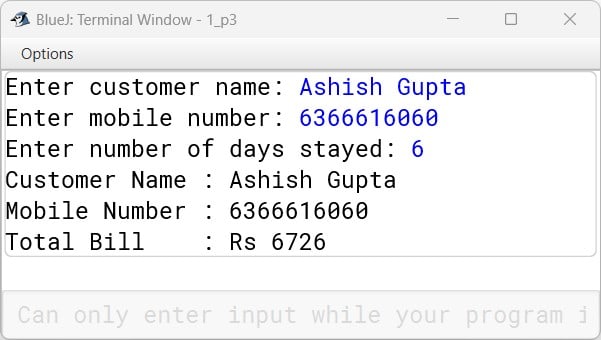
Define a class with following specifications.
class name: Hotel
Member variables:
String name – stores name of customer name
long mobno – stores mobile number
int days – stores number of days customer stayed in hotel
int bill – stores customer bill
Member method:
void input() – input values using Scanner class methods only
void charge() – calculate bill as per the following criteria
| days | charge/day |
|---|---|
| first 3 days | 1000 Rs/ day |
| next 4 days | 900 Rs/day |
| > 7 days | 800 Rs/day |
bill = bill + gst (18% of bill)
void print() - Display customer name, mobile number and bill.
Invoke all the above methods in main method with the help of an object.
import java.util.Scanner;

class Hotel {
    String name;
    long mobno;
    int days;
    int bill;

    void input() {
        Scanner sc = new Scanner(System.in);
        System.out.print("Enter customer name: ");
        name = sc.nextLine();
        System.out.print("Enter mobile number: ");
        mobno = sc.nextLong();
        System.out.print("Enter number of days stayed: ");
        days = sc.nextInt();
    }

    void charge() {
        if (days <= 3) {
            bill = days * 1000;
        } else if (days <= 7) {
            bill = (3 * 1000) + (days - 3) * 900;
        } else {
            bill = (3 * 1000) + (4 * 900) + (days - 7) * 800;
        }
        bill += bill * 0.18;
    }

    void print() {
        System.out.println("Customer Name : " + name);
        System.out.println("Mobile Number : " + mobno);
        System.out.println("Total Bill    : Rs " + bill);
    }

    public static void main(String[] args) {
        Hotel h = new Hotel();
        h.input();
        h.charge();
        h.print();
    }
}
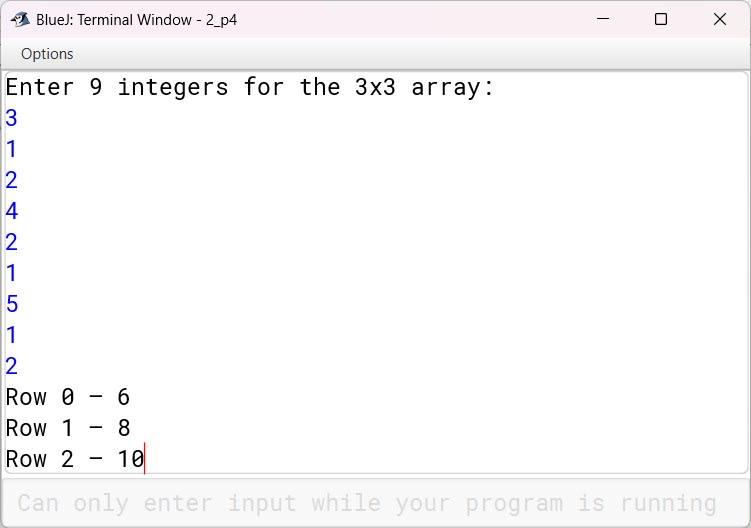
Define a class to accept values into a 3x3 integer array and print the product of each row elements.
Example:
| 3 | 1 | 2 |
| 4 | 2 | 1 |
| 5 | 1 | 2 |
Output:
Row 0 – 6
Row 1 – 8
Row 2 – 10
import java.util.Scanner;

public class RowProduct {
    public static void main(String[] args) {
        Scanner sc = new Scanner(System.in);
        int[][] arr = new int[3][3];

        System.out.println("Enter 9 integers for the 3x3 array:");
        for (int i = 0; i < 3; i++) {
            for (int j = 0; j < 3; j++) {
                arr[i][j] = sc.nextInt();
            }
        }

        for (int i = 0; i < 3; i++) {
            int product = 1;
            for (int j = 0; j < 3; j++) {
                product *= arr[i][j];
            }
            System.out.println("Row " + i + " – " + product);
        }
    }
}
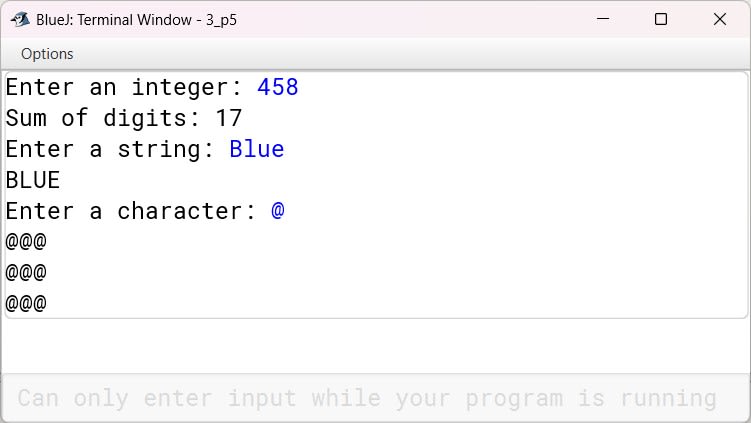
Define a class to overload the method transform as follows:
int transform(int n) – to return the sum of the digits of the given number
Example: n = 458
output : 17
void transform(String s) – to convert the given String to upper case and print
Example: if S = “Blue”
Output : BLUE
void transform (char ch) – to print the character ch in 3 rows and 3 columns using nested loops.
Example: if ch = ‘@’
Output :
@@@
@@@
@@@
import java.util.Scanner;

public class OverloadTransform {

    int transform(int n) {
        int sum = 0;
        while (n > 0) {
            int d = n % 10;
            sum += d;
            n /= 10;
        }
        return sum;
    }

    void transform(String s) {
        String str = s.toUpperCase();
        System.out.println(str);
    }

    void transform(char ch) {
        for (int i = 0; i < 3; i++) {
            for (int j = 0; j < 3; j++) {
                System.out.print(ch);
            }
            System.out.println();
        }
    }

    public static void main(String[] args) {
        Scanner sc = new Scanner(System.in);
        OverloadTransform obj = new OverloadTransform();

        System.out.print("Enter an integer: ");
        int num = sc.nextInt();
        System.out.println("Sum of digits: " + obj.transform(num));

        sc.nextLine();
        System.out.print("Enter a string: ");
        String str = sc.nextLine();
        obj.transform(str);

        System.out.print("Enter a character: ");
        char ch = sc.next().charAt(0);
        obj.transform(ch);
    }
}
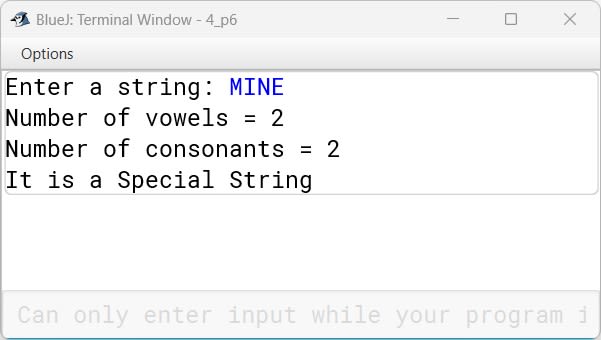
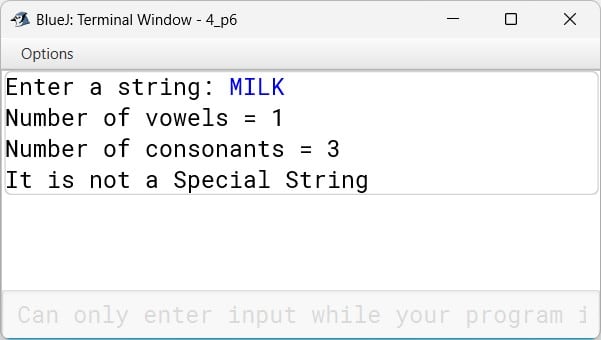
Define a class to accept a string. Check if it is a Special String or not.
A String is Special if the number of vowels equals to the number of consonants.
Example: MINE
Number of vowels = 2
Number of Consonants = 2
import java.util.Scanner;

public class SpecialString {
    public static void main(String[] args) {
        Scanner sc = new Scanner(System.in);

        System.out.print("Enter a string: ");
        String str = sc.nextLine().toUpperCase();

        int vowels = 0, consonants = 0;
        int len = str.length();

        for (int i = 0; i < len; i++) {
            char ch = str.charAt(i);
            if (ch >= 'A' && ch <= 'Z') {
                if (ch == 'A'
                    || ch == 'E'
                    || ch == 'I'
                    || ch == 'O'
                    || ch == 'U')
                    vowels++;
                else
                    consonants++;
            }
        }

        System.out.println("Number of vowels = " + vowels);
        System.out.println("Number of consonants = " + consonants);

        if (vowels == consonants)
            System.out.println("It is a Special String");
        else
            System.out.println("It is not a Special String");
    }
}
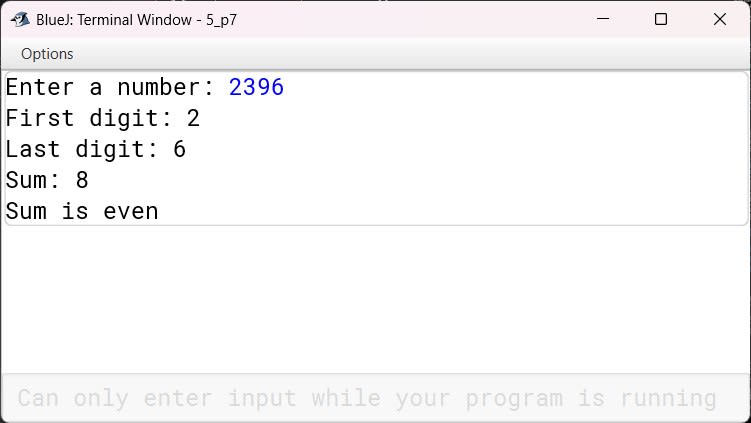
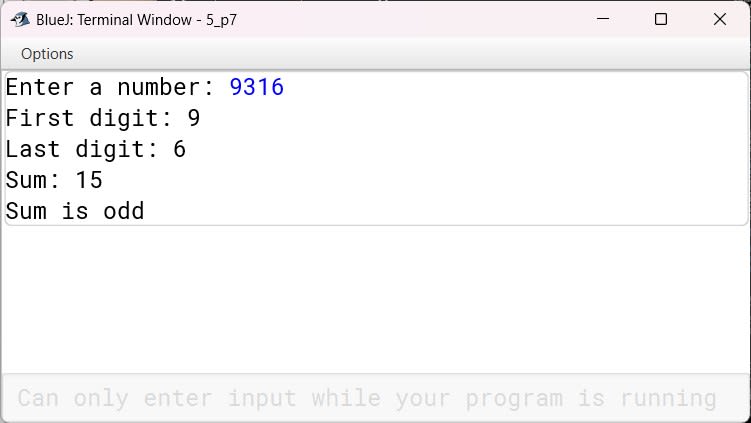
Define a class to accept a number and check if the sum of the first digit and the last digit is an even number or an odd number.
Example:
            N = 2396    N = 9316
First digit:   2         9
Last digit:    6         6
Sum:           8         15
Output: Sum is even  Sum is odd
import java.util.Scanner;

public class FirstLastSum {
    public static void main(String[] args) {
        Scanner sc = new Scanner(System.in);

        System.out.print("Enter a number: ");
        int n = sc.nextInt();

        int lastDigit = n % 10;
        int firstDigit = n;
        while (firstDigit >= 10) {
            firstDigit /= 10;
        }

        int sum = firstDigit + lastDigit;

        System.out.println("First digit: " + firstDigit);
        System.out.println("Last digit: " + lastDigit);
        System.out.println("Sum: " + sum);

        if (sum % 2 == 0)
            System.out.println("Sum is even");
        else
            System.out.println("Sum is odd");
    }
}
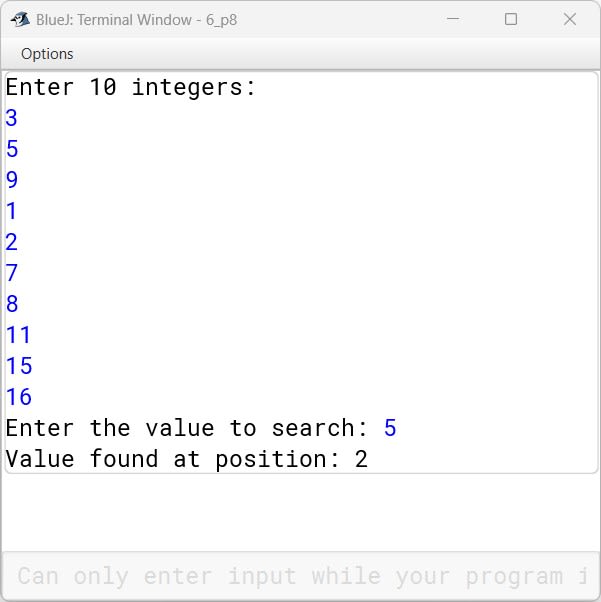
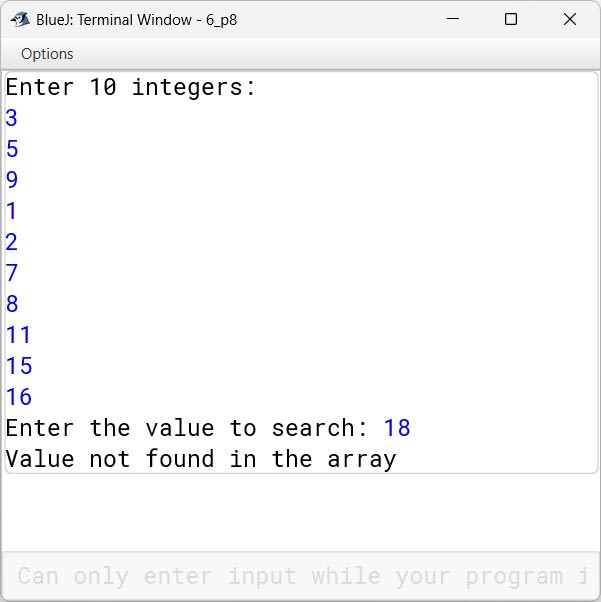
Define a class to accept 10 integers in an array, search for the given value using the Linear Search technique and print appropriate messages.
import java.util.Scanner;
public class LinearSearchArray {
    public static void main(String[] args) {
        Scanner sc = new Scanner(System.in);
        int[] arr = new int[10];

        System.out.println("Enter 10 integers:");
        for (int i = 0; i < 10; i++) {
            arr[i] = sc.nextInt();
        }
        System.out.print("Enter the value to search: ");
        int key = sc.nextInt();
        int i = 0;

        for (i = 0; i < 10; i++) {
            if (arr[i] == key) {
                break;
            }
        }

        if (i < 10)
            System.out.println("Value found at position: " + (i + 1));
        else
            System.out.println("Value not found in the array");
    }
}