
Robotics & Artificial Intelligence
Observe the workflow of a mobile robot, which is used in a warehouse to transport packages and create similar workflows for different robots in the industry.
Step 1: Request: Receive transport request from the operator or warehouse manager.
Step 2: Navigation: Navigate in warehouse by using sensors and cameras. The sensor and camera input goes to the controller. It generates signals for the actuators to avoid obstacles and find a suitable path.
Step 3: Pickup the package: After reaching the destination, the robot uses a gripper to pick up the package. The package may be located at a shelf or conveyor.
Step 4: Send package: After picking up the package, the robot sends the package to the desired location, which may be an area within the warehouse, loading dock, or shipping area. For this, again, the robot navigates with the help of sensors, actuators and manipulators, and all the control signals are generated by the controller of the robot.
Step 5: Deliver package: The robot delivers the package to the designated location by releasing grippers or any other mechanism.
Step 6: Return: The robot goes back to its starting location or charging station and waits for the next request.
Robot as a System
1 Like
Answer
Workflow of Yamaha YK400XR Industrial Robot:
Step 1: Task Request: The Yamaha YK400XR robot receives a task request from the industrial control system for welding or material handling.
Step 2: Positioning: The robot positions its arm at the required work location using sensors. Sensor input is sent to the controller, which generates signals for actuators to move the joints accurately.
Step 3: Perform Operation: After reaching the correct position, the robot performs the assigned task such as welding, pick-and-place, or assembly using the appropriate end-effector.
Step 4: Monitoring: During the operation, sensors continuously monitor position and accuracy. The controller adjusts actuator movement if required.
Step 5: Task Completion: Once the task is completed, the robot stops the operation and releases the component.
Step 6: Reset / Standby: The robot returns to its home position and waits for the next task request.
Answered By
2 Likes
Related Questions
Explore the internet or look at the various devices installed at your home or school and find out the data transfer range of the following wireless devices:
- Bluetooth
- Zigbee
- Wi-Fi
Observe the following humanoid robot and identify its various components. Write the components under appropriate headings in the space provided for answer.
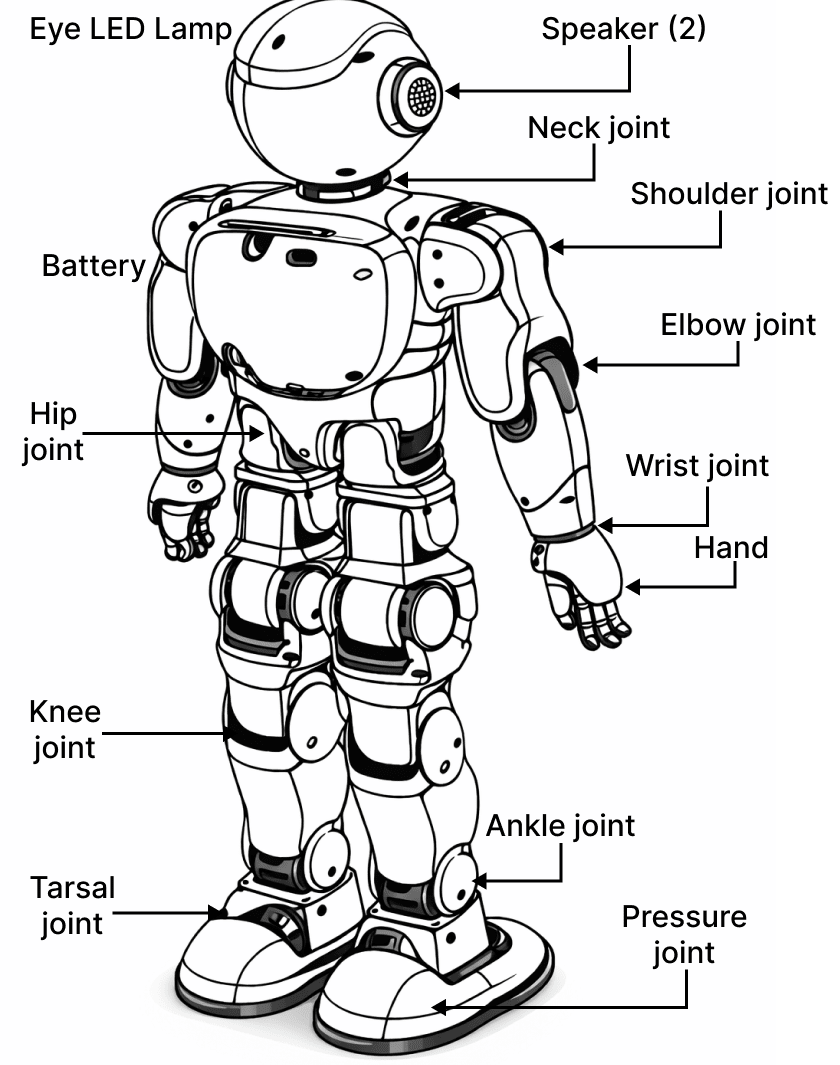
Sensors
- ……………
- ……………
- ……………
Power Sources
- ……………
- ……………
Manipulators
- ……………
- ……………
- ……………
- ……………
- ……………
- ……………
Sensors are used to measure environmental variables.
A light sensor detects the presence of an object.