
Computer Applications
Write all the steps to perform the following task in MS Excel:
Renaming Sheet Tab
Spreadsheet
24 Likes
Answer
Step 1: Select the Sheet Tab that you want to rename.
Step 2: Right-click on the sheet tab. Choose the 'Rename' option from the pop-up list.
Step 3: Type a name in the 'Sheet Tab' box.
Step 4: Press the 'Enter' key.
Answered By
14 Likes
Related Questions
Write all the steps to perform the following task in MS Excel:
Selecting partial range in a row
Write all the steps to perform the following task in MS Excel:
Selecting multiple columns in a worksheet
Write all the steps to perform the following task in MS Excel:
Preparing a chart by using a sample data table
You have purchased some textbooks from a bookstore, as given below:
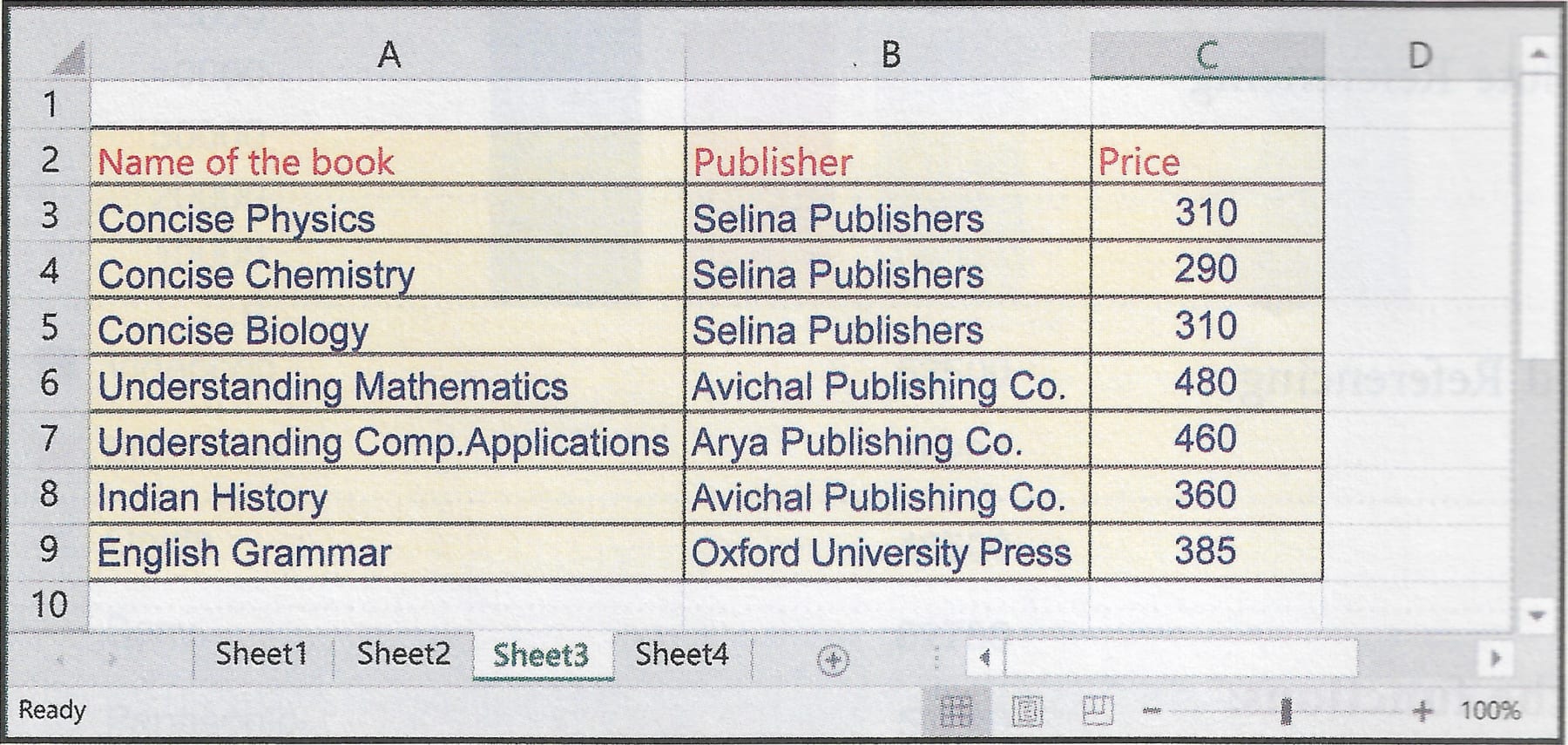
Write the steps involved to perform the following tasks in MS Excel on the table given above.
- Find the average price of the books.
- If the bookseller offers 10% discount, then calculate the amount to be paid to the shopkeeper.
- Find the price of the book which had the highest price among the books you bought.
- Calculate the total amount paid at the bookstore.