
Computer Applications
You have purchased some textbooks from a bookstore, as given below:
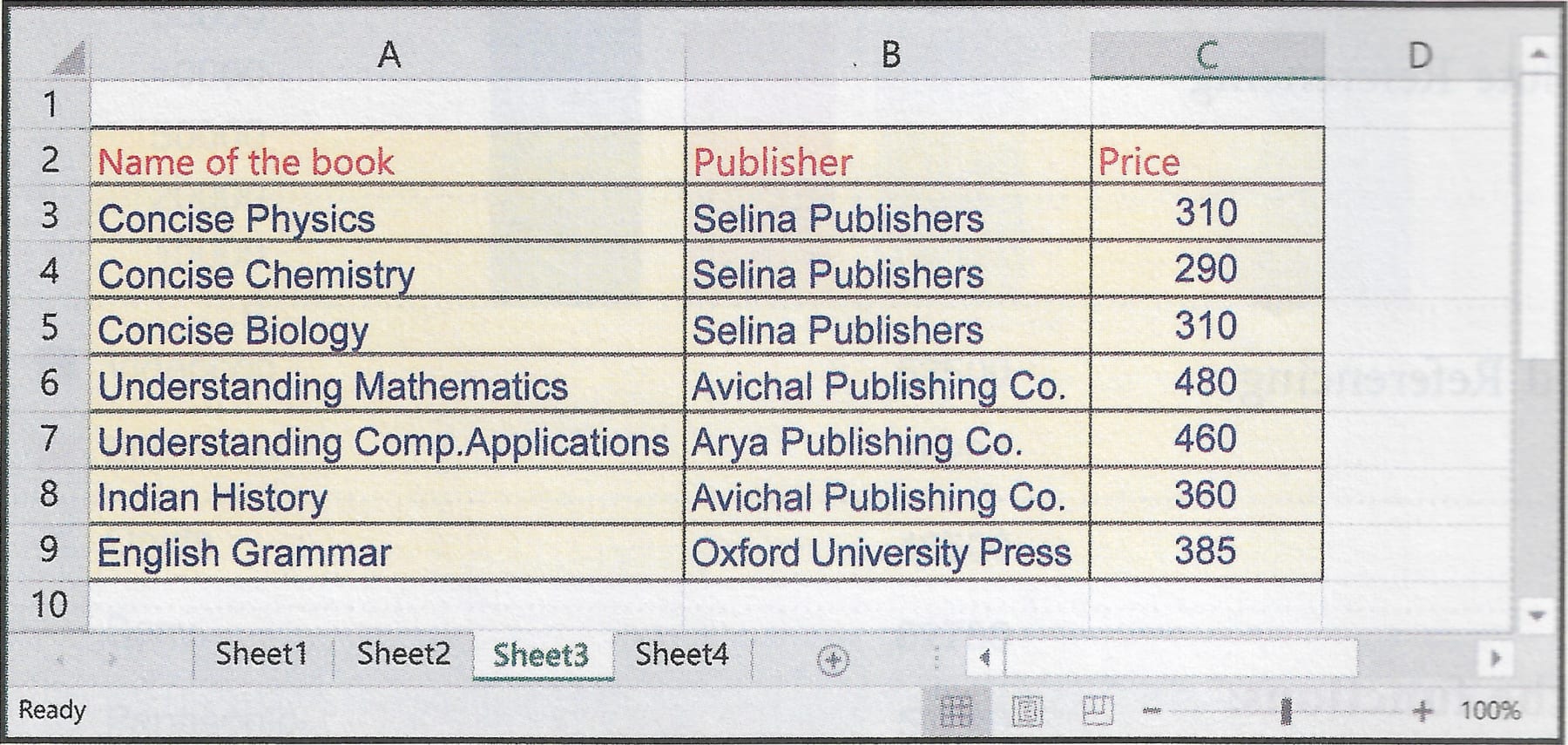
Write the steps involved to perform the following tasks in MS Excel on the table given above.
- Find the average price of the books.
- If the bookseller offers 10% discount, then calculate the amount to be paid to the shopkeeper.
- Find the price of the book which had the highest price among the books you bought.
- Calculate the total amount paid at the bookstore.
Spreadsheet
51 Likes
Answer
To find the average price of the books, follow these steps:
Step 1 — Select the cell where you want to display the average price of the books.
Step 2 — Type the formula =AVERAGE(C3:C9) in the cell.
Step 3 — Press 'Enter' key.
The average price of the books will be calculated.
To calculate the amount to be paid to the shopkeeper, follow these steps:
Step 1 — Select cell D3.
Step 2 — Write the formula =C3-(C3*0.1) and press enter key.
Step 3 — Select cell D3 again and drag the cell handle from D3 till D9.
Step 4 — Select cell D10.
Step 5 — Write the formula =SUM(D3:D9) and press enter key.
Cell D10 shows the amount payable to the shopkeeper.
To find the price of the book which had the highest price among the books you bought, follow these steps:
Step 1 — Select the cell where you want to display the result.
Step 2 — Type the formula =MAX(C3:C9) in the cell.
Step 3 — Press 'Enter' key.
The price of the most expensive book will be displayed.
To calculate the total amount to be paid to the shopkeeper, follow these steps:
Step 1 — Select the cell C10.
Step 2 — Type the formula =SUM(C3:C9) in the cell.
Step 3 — Press 'Enter' key.
C10 will display the total amount to be paid to the shopkeeper.
Answered By
30 Likes
Related Questions
Write all the steps to perform the following task in MS Excel:
Deleting a worksheet
Write all the steps to perform the following task in MS Excel:
Selecting partial range in a row
Write all the steps to perform the following task in MS Excel:
Selecting multiple columns in a worksheet
Write all the steps to perform the following task in MS Excel:
Preparing a chart by using a sample data table