
Computer Applications
A customer downloads a bank account statement from an online bank.
The statement is downloaded into a spreadsheet.
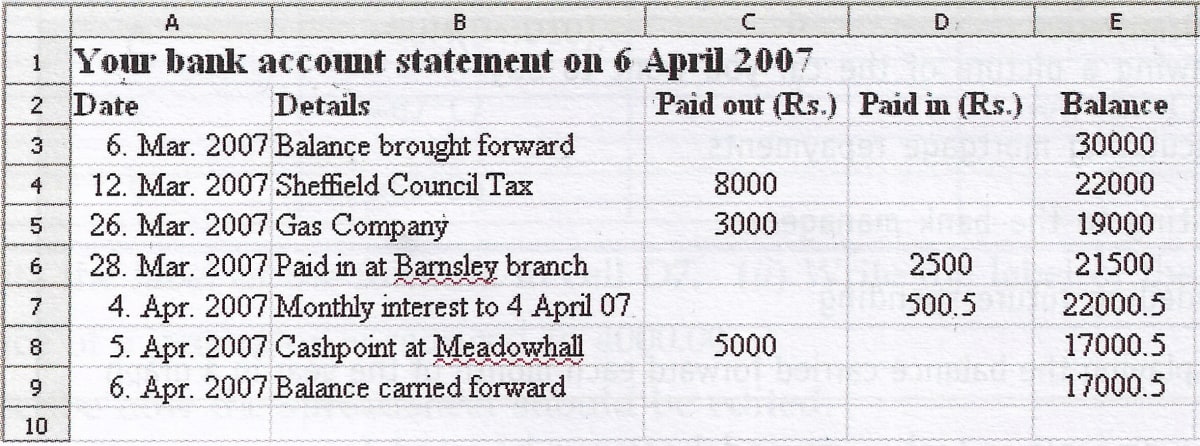
(a) Tick three boxes to show what can be contained in a cell in a spreadsheet.
| Tick three boxes | |
|---|---|
| A mouse | |
| A date | |
| A number | |
| A website | |
| A picture | |
| A word processor |
(b) The cell reference of the cell which contains 'Balance brought forward' is B3.
- Write down the cell reference of the cell which contains .'Gas Company'.
- Write down the cell reference of the cell which contains .'Paid out'.
(c) Tick one box to show the formula contained in cell E6.
| Tick one box only | |
|---|---|
| =E6 + C6 + D6 | |
| =E5 - C6 + D6 | |
| =D5 + D6 + D7 | |
| =E5 * C6 * D6 | |
| =E5 + C5 + D5 |
(d) Tick one box to show the formula contained in cell E9.
| Tick one box only | |
|---|---|
| =E8 | |
| =E8 - C8 + D8 | |
| =E7 * C8 * D8 | |
| =E8 + D8 | |
| =E8 - C8 |
(e) (i) Tick three boxes to show what a spreadsheet should be used for.
| Tick three boxes | |
|---|---|
| Controlling output from a scanner | |
| Drawing a picture of the car you want to buy | |
| Calculating mortgage repayments | |
| Writing to the bank manager | |
| Modelling future spending | |
| Displaying the balance carried forward each month of the year in a graph |
(ii) State one other task a spreadsheet can be used for.
(f) The customer is using a word processor to fill in a tax return.
The customer needs to copy the monthly interest into the tax return.
Write down the labels in order to show how cell D7 could be copied into the tax return.
| Label | |
|---|---|
| A | Position the cursor in the word processor |
| B | Select copy |
| C | Select paste |
| D | Highlight D7 in the spreadsheet |
(g) The customer saves the statement on a flash memory stick. Give one reason why this may not be secure and suggest a way to make the statement more secure.
(h) Tick one box to show how much space the spreadsheet file (.ods) is likely to use on backing storage.
| Tick one box only | |
|---|---|
| 150 Megabytes | |
| 80 Gigabytes | |
| 15 Kilobytes | |
| 10 bytes | |
| 0 bytes |
OOo Calc
4 Likes
Answer
(a)
| Tick three boxes | |
|---|---|
| A mouse | |
| A date | ✓ |
| A number | ✓ |
| A website | |
| A picture | ✓ |
| A word processor |
(b)
- The cell which contains 'Gas Company' is B5.
- The cell which contains 'Paid out' is C2.
(c) Formula contained in cell E6:
| Tick one box only | |
|---|---|
| =E6 + C6 + D6 | |
| =E5 - C6 + D6 | ✓ |
| =D5 + D6 + D7 | |
| =E5 * C6 * D6 | |
| =E5 + C5 + D5 |
(d) Formula contained in cell E9:
| Tick one box only | |
|---|---|
| =E8 | ✓ |
| =E8 - C8 + D8 | |
| =E7 * C8 * D8 | |
| =E8 + D8 | |
| =E8 - C8 |
(e)
(i) A spreadsheet should be used for:
| Tick three boxes | |
|---|---|
| Controlling output from a scanner | |
| Drawing a picture of the car you want to buy | |
| Calculating mortgage repayments | ✓ |
| Writing to the bank manager | |
| Modelling future spending | ✓ |
| Displaying the balance carried forward each month of the year in a graph | ✓ |
(ii) Spreadsheet can also be used to compute and manage student grades for academic purposes.
(f) To copy the monthly interest from cell D7 into the tax return, follow the given steps:
D — Highlight D7 in the spreadsheet
B — Select copy
A — Position the cursor in the word processor
C — Select paste
(g) Storing a bank statement on a flash memory stick may not be secure due to the risk of physical loss or theft. If the memory stick is misplaced or stolen, unauthorized individuals could gain access to sensitive financial information.
To make the statement more secure, use password protection. To set a password for an OOo Calc document, follow the given steps:
Step 1 — Open the statement in OOo Calc.
Step 2 — Go to "File" > "Save As."
Step 3 — In the "Save As" dialog box, check the "Save with password" option.
Step 4 — Enter and confirm your desired password.
Step 5 — Save the document.
(h) Space used by spreadsheet file (.ods) on backing storage:
| Tick one box only | |
|---|---|
| 150 Megabytes | |
| 80 Gigabytes | |
| 15 Kilobytes | ✓ |
| 10 bytes | |
| 0 bytes |
Answered By
3 Likes
Related Questions
Write commands for the operations (i) — (ii) based upon the spreadsheet shown below :
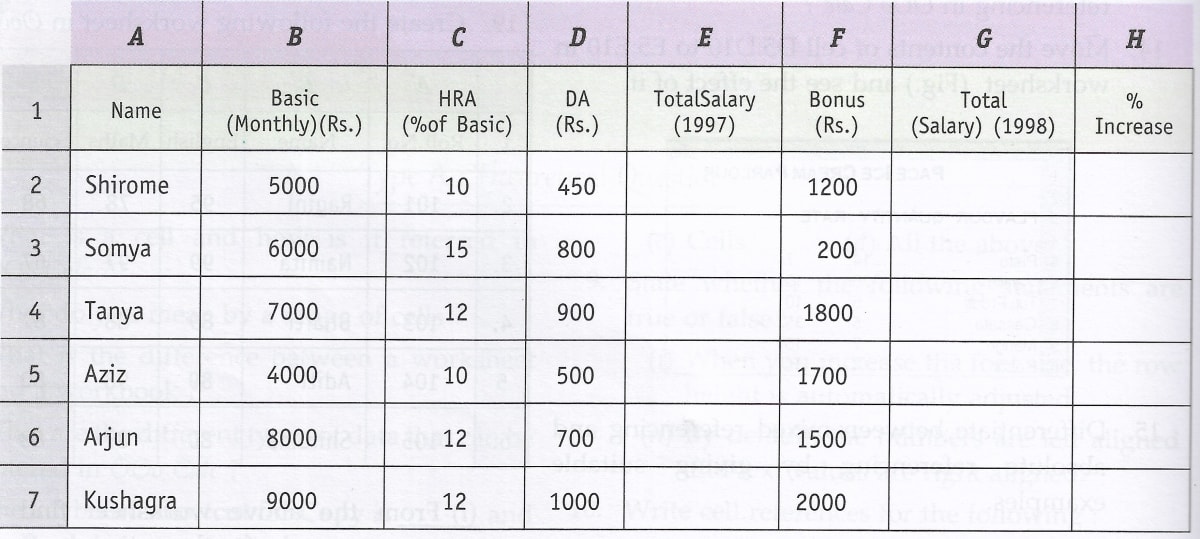
(i) To calculate the total salary as sum of Basic Salary, HRA and DA for each employee for the year 1997.
(ii) To calculate the total salary of each employee for the year 1998 as sum of salary for the year 1997 and bonus. Also calculate the percentage increase in the total salary from 1997 to 1998 for each employee.
A university student uses a PC to help plan a budget for the first term. Their first attempt is shown below.
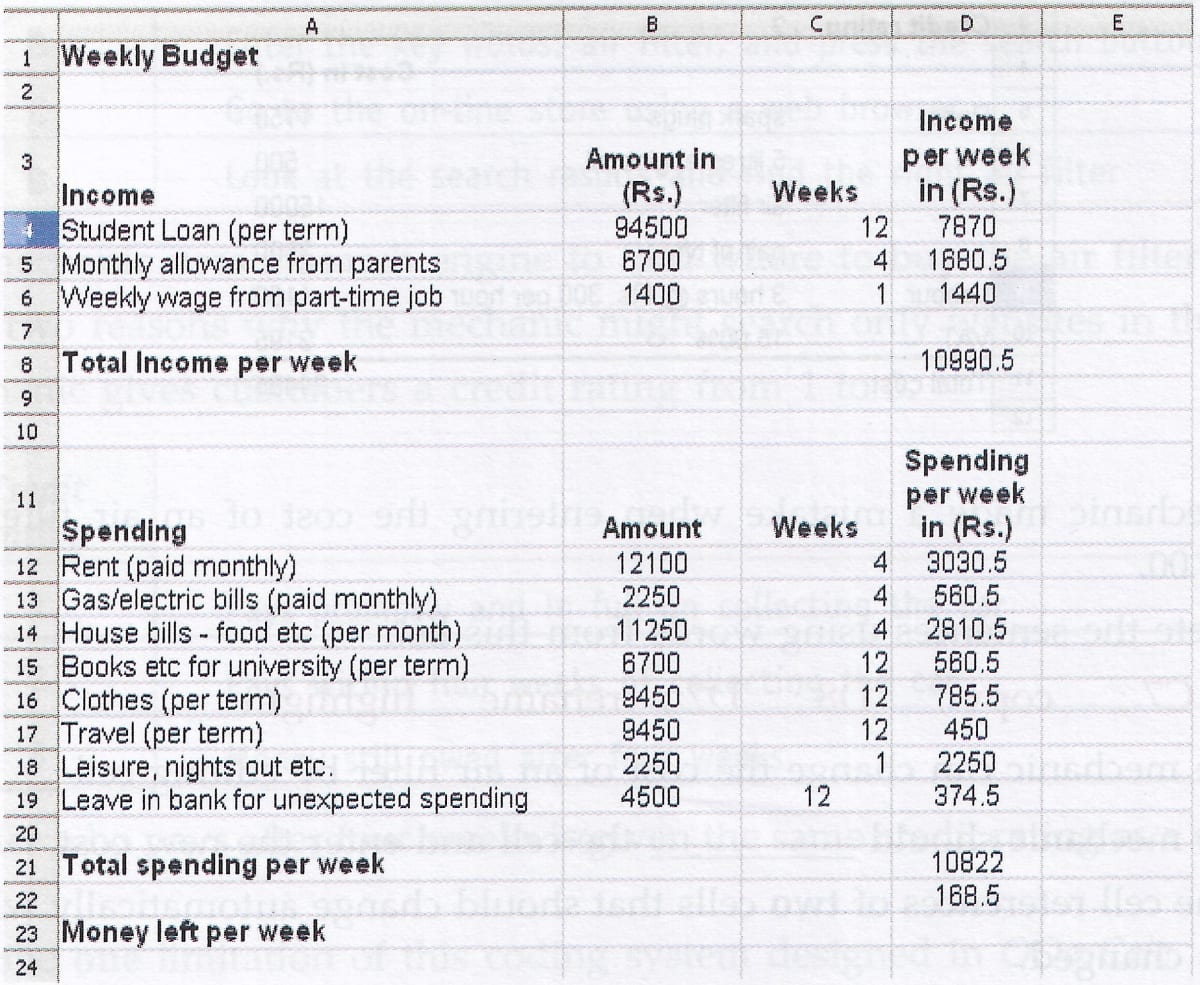
(a) Tick one box to show which type of software package has been used.
Tick one box only Graphics Database Spreadsheet Multimedia (b) Which cell contains the spending on rent per week ?
(c) Which one of the following is the formula used in cell D23 ?
Tick one box only = D21 - D8 = D8 - D21 = sum(D2 : D12) (d) Tick one box to show a disadvantage of using a software package to help work out the budget rather than using a calculator, pen and paper.
Tick one box only The formulae could be wrong The wrong prices could be input A virus may corrupt the information Multiple printouts could be produced A self-employed car mechanic uses a spreadsheet to calculate bills for customers.
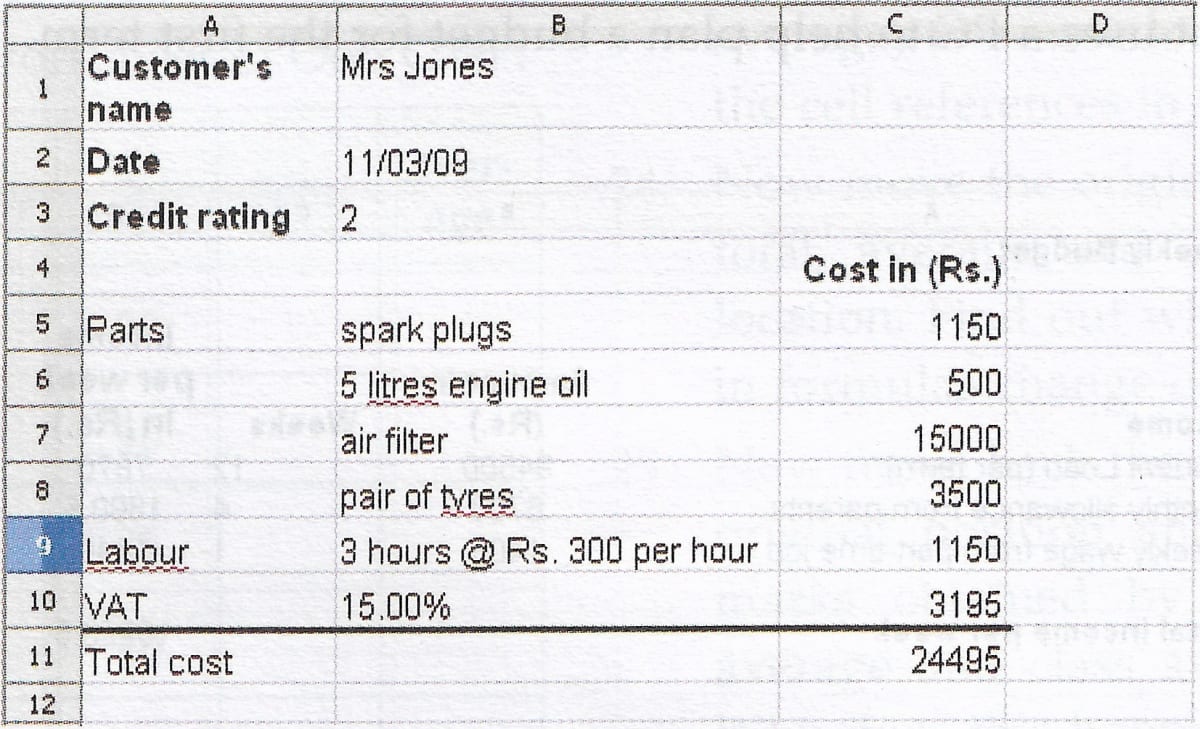
(a) The mechanic made a mistake when entering the cost of an air filter. An air filter costs Rs. 400.00.
Complete the sentences using words from this list.
C7 ; copy ; D8 ; D7 ; rename ; highlight
(i) The mechanic can change the cost of an air filter by editing cell ……………… .
(ii) The mechanic should ……………… the cell and enter the new cost.
(b) Give the cell references of two cells that should change automatically when the cost of an air filter is changed.
(c) Cells can contain numbers or text.
Tick three boxes to show other types of information a cell can contain.
Tick three boxes Printer Website address Idea Formula Picture Word processor (d) On-line help is available within the spreadsheet.
Tick three boxes to show what should be in the on-line help for the spreadsheet.
Tick three boxes A lesson on percentages so the mechanic can calculate VAT An index to help the mechanic find the information needed A road map to help the mechanic find the route to the parts warehouse A tutorial guide to help the mechanic use the spreadsheet A dictionary that helps the mechanic understand the meaning of words A search engine to help the mechanic find the information needed (e)
(i) The mechanic has to buy the air filter from an on-line store.
Write the labels in order to show how the mechanic can do this.
Label A Pay using a credit card B Enter the key words: air filter, and press the search button C Go to the on-line store using a web browser D Look at the search results and find the right air filter (ii) The mechanic uses a search engine to find where to buy the air filter.
State two reasons why the mechanic might search only websites in the India.
(f) The mechanic gives customers a credit rating from 1 to 3.
Credit Rating 1 Pays promptly and in full on collecting the car 2 Pays within four weeks of collecting the car 3 Money still owed after four weeks A customer who pays after four weeks is given the same credit rating as a customer who does not pay.
(i) Describe one limitation of this coding system designed in OOo Calc.
(ii) Design an improved coding system, if possible.
A finance officer uses a spreadsheet to record sales from an equipment shop. This is part of the spreadsheet.
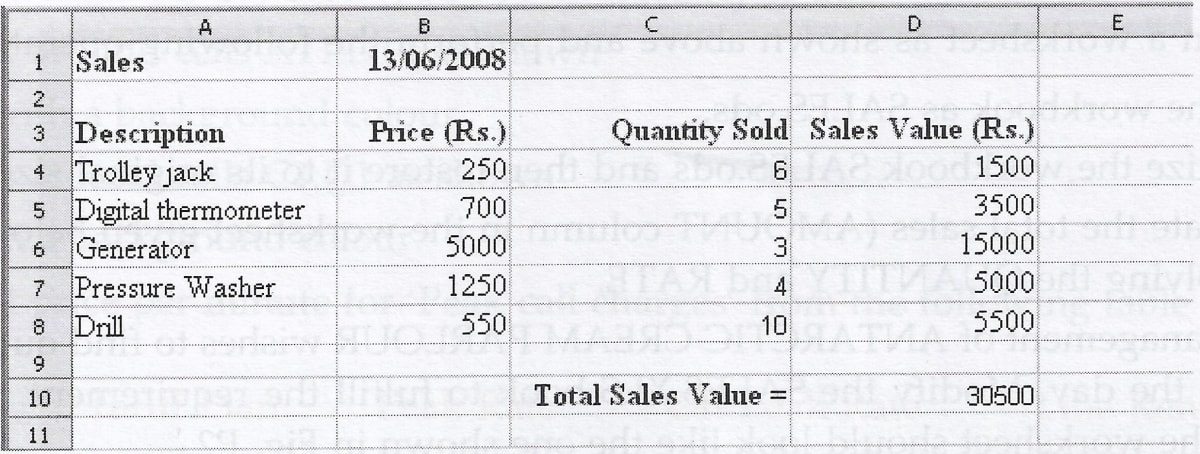
(a)
Label Formula Label Formula A =SUM(D4 : D10) D =SUM(D4 : D8) B =B7 * C7 E =A7 * B7 * C7 C =C6 * D6 - Write the label of the formula in cell D7.
- Write the label of the formula in cell D10.
(b) The price of a generator is reduced to 4000.00.
- Describe how the spreadsheet should be edited.
- When the spreadsheet was edited, the values displayed in some cells changed automatically. Write in the box the cell reference of two cell that changed automatically.
- Tick one box to show why a cell would change automatically when another cell is edited.
Tick one box only Spreadsheet cells are all linked The cell contains a formula that refers to the other cell All the cells know what is happening in other cells The cell contains a description that refers to the other cell The spreadsheet contains a graph