
Computer Science
Shreya Sharma, a student of SMS School, has written a program to store Roman numbers and find their equivalents using a dictionary. She has written the following code. As a programmer, help her to successfully execute the given task.
import ............... #Line 1
numericals = {1: 'I', 4 : 'IV', 5: 'V', 9: 'IX',
            10: 'X', 40: 'XL', 50: 'L', 90: 'XC',
            100: 'C', 400: 'CD', 500: 'D', 900: 'CM',
            1000: 'M'}
file1 = open("roman.dat", "...............") #Line 2
pickle.dump(numerals, file1)
file1.close()
file2 = open("roman.dat", " ............... ") #Line 3
num = pickle.load(file2)
file2. ............... #Line 4
n = 0
while n != -1:
    print("Enter 1,4,5,9,10,40,50,90,100,400,500,900,1000:")
    print("or enter -1 to exit")
    n = int(input("Enter numbers"))
    if n! = -1:
        print("Equivalent roman number of this numeral is : ", num [n])
    else:
        print("Thank You")
(i) Name the module she should import in Line 1.
(ii) In which mode Shreya should open the file to add data into the file in Line 2.
(iii) Fill in the blank in Line 3 to read the data from a binary file.
(iv) Fill in the blank in Line 4 to close the file.
Python File Handling
2 Likes
Answer
(i) Shreya should import the "pickle" module in Line 1 to work with binary file.
(ii) Shreya should open the file in write-binary mode ("wb") in Line 2 to add data to the file.
(iii) Shreya should fill in Line 3 with "rb" to read data from a binary file.
(iv) Shreya should use close() in Line 4 to close the file after reading the data.
Answered By
3 Likes
Related Questions
To provide telemedicine facility in a hilly state, a computer network is to be set up to connect hospitals in 6 small villages (V1, V2, …, V6) to the base hospital (H) in the state capital. This is shown in the following diagram.
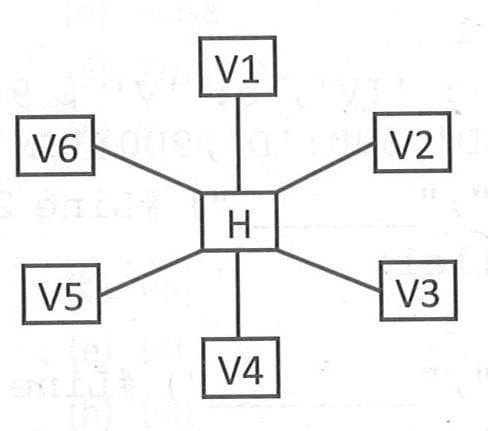
No village is more than 20 km away from the state capital. Imagine yourself as a computer consultant for this project and answer the following questions with justification:
(i) Out of the following, what kind of link should be provided to set up this network: Microwave Link, Radio Link, Wired Link?
(ii) Many a time doctors at the village hospital have to consult senior doctors at the base hospital. How should they contact them—through email, SMS, telephone or video conference?
(iii) Out of SMTP and POP3, which protocol is used to receive emails?
(iv) Expand the following terms:
(a) VoIP
(b) HTTPS
(v) Mention any two advantages of using Star topology.
Write the output of the code given below:
p=8 def sum(q=5, r=6) : p=(r+q)**2 print(p, end= '#') sum(p) sum(r=3,q=2)The code given below accepts the roll number of a student and deletes the record of that student from the table STUDENT. The structure of a record of table Student is: RollNo — integer; Name — string; Class — integer; Marks — integer.
Note the following to establish connectivity between Python and MySQL:
• Username is root, Password is A5_b23.
• The table exists in a MySQL database named SCHOOL.Write the following missing statements to complete the code:
Statement 1— to create the cursor object
Statement 2 — to execute the query
Statement 3 — to make the deletion in the database permanent
import mysql.connector as mysql def sql data(): conn=mysql.connect(host="localhost", user="root", password=" ", database="school") ............... #Statement 1 rno=int(input("Enter Roll Number : ")) qry="delete from student where RollNo={}".format(rno) ............... #Statement 2 ............... #Statement 3 print ("Record deleted")What is meant by serialization and deserialization in the context of binary files?