
Computer Applications
Create the following worksheet and save the workbook as WAGES.ods.

(i) Find out the number of days each worker has worked, by subtracting date on which worker was hired from today's date.
(ii) Calculate Gross wages for each worker. The gross wages can be calculated by using the following formula :
Gross wages = No. of days worked * Pay rate
OOo Calc
24 Likes
Answer
(i) To find out the number of days each worker has worked, follow the given steps:
Step 1 — Select cell C7 and type the formula =C3 - B7. Press Enter key. The number of working days will appear in the cell.
The given formula subtracts the date on which the worker was hired from today's date. This gives us the number of days the worker has worked.
Step 2 — With C7 selected, dragging the cell handle from C8 to C12 will copy the formula to the cell range [C8 : C12].
Notice that the formula =C3 - B7 will modify itself according to the cell. Cell address C3 is an absolute address, so it will not change. But the relative address B7 will change according to the position of the cell.
So, the formula =C3 - B8 will be pasted in cell C8, =C3 - B9 will be pasted in C9, =C3 - B10 will be pasted in cell C10 and so on.

(ii) To calculate the gross wages for each worker, follow the given steps:
Step 1 — Select cell D7 and type the formula =C7*C4. Press Enter key. The gross wages of Kushagra will appear in the cell.
The given formula multiplies the number of working days and the pay rate per day.
Step 2 — With D7 selected, dragging the cell handle from D8 to D12 will copy the formula to the cell range [D8 : D12].
Notice that the formula =C7*C4 will modify itself according to the cell. Cell address C4 is an absolute address, so it will not change. But the relative address C7 will change according to the position of the cell.
So, the formula =C8*C4 will be pasted in cell D8, =C9*C4 will be pasted in D9, =C10*C4 will be pasted in cell D10 and so on.

Answered By
16 Likes
Related Questions
What is the difference between copying and moving a range ?
What is the difference between the following commands :
Edit → Delete Contents → Delete all and
Edit → Delete Contents → TextEdit → Delete Contents → Text and
Edit → Delete Contents → FormatsEdit → Delete Contents → Text and
Edit → Delete Contents → Notes
Create the following worksheet in Ooo Calc.
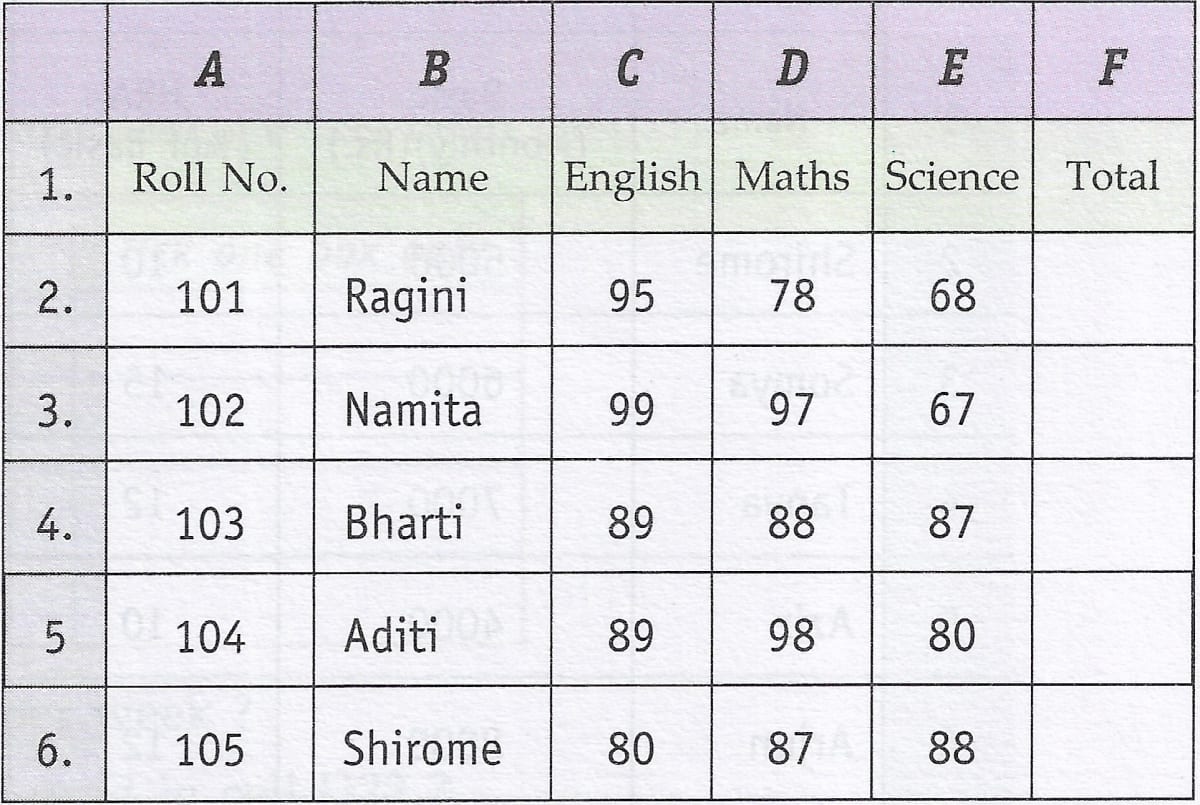
(i) From the above worksheet find out the average marks for the entire class.
(ii) Now copy the range consisting of the mentioned data (including total, average & class average) to a new location. Find out whether the cell references change or not.
(iii) Now move the original data range to a new location. Find out whether the cell references change or not.
(iv) Again move back the data to its original position and make changes in the marks obtained by students. Notice total, average and class average. What happens ? Why does this happen ?
Clear the copied data range (do not touch the 23. original data range).